Tree / Self Hosting / Movies & TV Shows / Jellyfin / VideoOSD
VideoOSD Tweaks & Candy
Full control over the Jellyfin video player: VLC-style controls, quick actions and artwork overlays in one plugin.
- Status
- Green · Released
- Type
- plugin
- Hours
- about 171
- Tokens
- about 18 M
1.1.0.0 and 2.0.0.0 are public for Jellyfin 10.10.7 and 12.0+, and all eight addons also run alone as scripts.
In this article
A player you can only accept as it is
The Jellyfin video OSD is functional, but fixed. You get what Jellyfin gives you, in the order Jellyfin decided. You cannot hide a button you never use or move one you use all the time. The controls I knew from VLC are not there: speed steps, frame stepping, an A-B loop, a quick screenshot, a quick download. Your library artwork disappears the moment playback starts.
There was a second gap, on my own side. All of this began as separate scripts running through a JavaScript injector, eight of them in the end. Scripts have no shared settings, no admin page and no way to decide what reaches which browser. Every option lived in the code of the script.
So the goal had two halves. Put the user in full control of the OSD: hide, reorder, extend. And turn a loose set of scripts into one configurable plugin, without turning it into something else. It had to stay native. It is not a skin, not a theme, not a custom player. The OSD should still look and feel like Jellyfin, and the scripts should keep working on their own for people who prefer them.
Four zones: hide, sort, add, candy
The OSD is split into four independent zones: top left, top right, bottom left and bottom right. Each is configured separately in the admin dashboard.
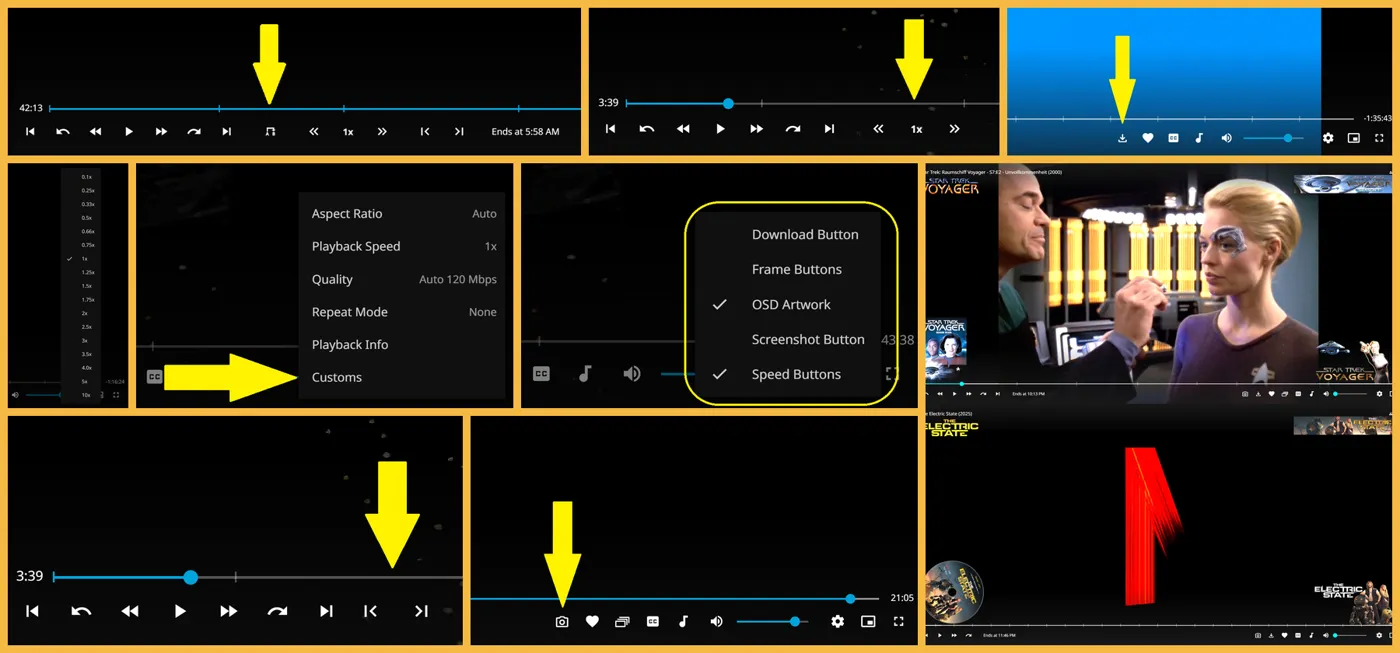
Hide. 25 vanilla options across the zones: back button, title parts, year, SyncPlay, Cast, play and pause, rewind and forward, chapter and track buttons, record, "Ends At", favorite, subtitles, audio, mute, volume slider, settings, AirPlay, picture-in-picture, fullscreen. There is also a Show Original Title option for films.
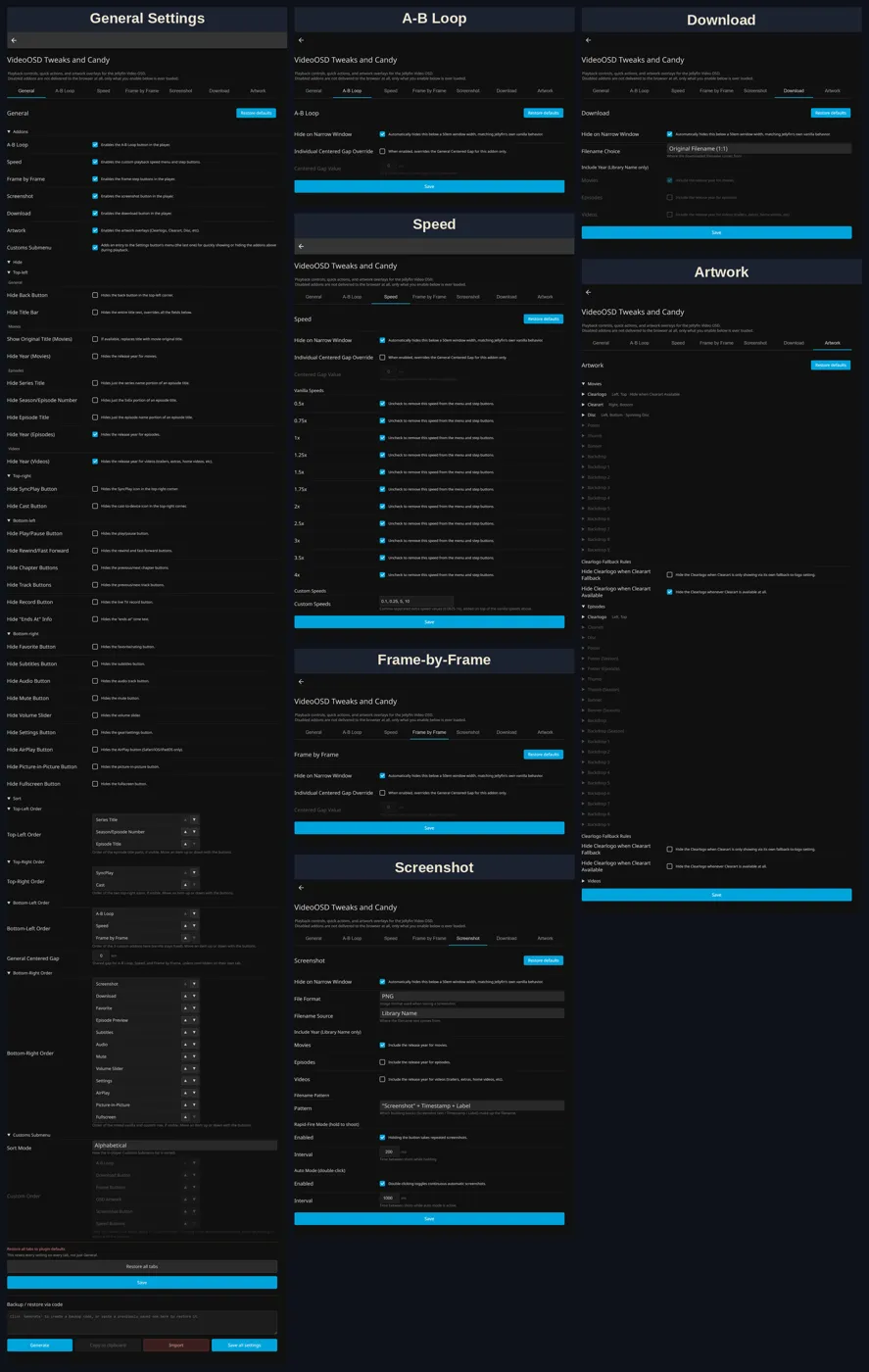
Sort. Every zone has its own order. For episodes the title splits into series, season and episode number, and episode title, each movable. In the bottom right, vanilla elements and addons sit in one unified list, including the third-party Episode Preview addon and the VisoMaster Bridge button when it is installed.
Add. The Custom Tweaks are optional addons, and each one can be enabled on its own:
- Custom On/Off Menu: a submenu in the playback settings that toggles addons without leaving the video.
- Custom Playback Speed Menu: your own speed list.
- Custom Playback Speed Buttons: step up and down, with a centre field that shows the speed and resets to 1x on click. The vanilla speeds from 0.5x to 4x can be chosen one by one, plus your own.
- Frame-by-Frame Buttons: one frame back or forward while paused, FPS-aware, within what Chrome's video engine allows. This is not a full VLC-style frame engine, and I say so in the README.
- A-B Loop Button: first click sets the start, the second the end, the third clears it. It is for desktop browsers by default, and the plugin can switch it on for touch and TV devices.
- Download Button: a direct 1:1 copy, no transcoding, named after the original file or the library entry.
- Screenshot Button: click for one, hold for rapid fire, double-click for auto mode, as PNG or JPG with seven naming patterns.
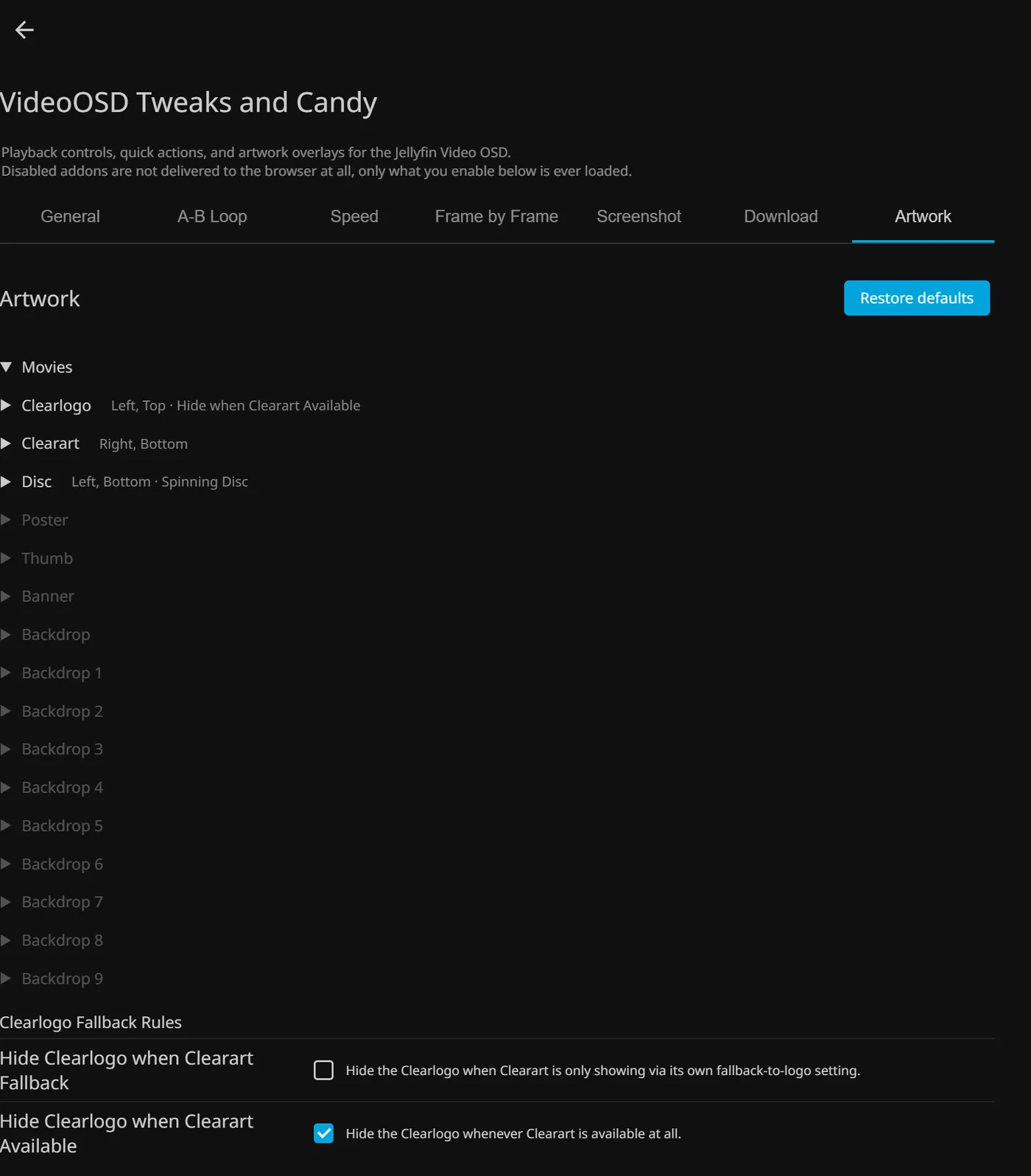
Candy. Artwork Display puts library artwork on the OSD during playback: logo, clearart, disc, poster, thumb, banner, backdrop, plus season variants and numbered backdrops for episodes. Each type is configured separately for films, episodes and videos, with source, position, offsets, maximum size and layer order. The disc can spin. My README warns that the showcase pictures are not a recommendation. One layer, at most two, looks best.
Instant OSD removes a flaw you could see. Normally the OSD rebuilds from its vanilla state into your custom state, and with many changes you can see that for a split second. After the first video following a settings change, the layout is cached locally, so the OSD is built in its custom state before the first frame.
Setting it up means installing the File Transformation plugin by IAmParadox27 first, then this plugin from the catalog. Jellyfin picks 1.x for 10.10.7 or 2.x for 12.0+. Settings can be reset per tab or for all, and backed up as a code. It is developed for and tested on Jellyfin Web 10.10.7 and 12.0+, Chrome and Windows 11.
Three layers from the outside
Three layers. A C# plugin stores settings in the Jellyfin backend and decides which addons reach the browser. Disabled addons are never delivered at all. Self-contained JavaScript addons implement the features, and targeted CSS handles spacing, order and fit, so nothing looks bolted on. The scripts come from a Core plus eight addons, 1,463 and 7,329 lines. The plugin carries 861 settings in my current build, and most of the bulk is artwork positioning, so the admin page is by far the largest single file.
The whole thing never touches Jellyfin's files. That is also why it is hard. Everything it does is done from outside to a page that was not designed for it.
From eight scripts to one plugin
First came the scripts, one feature at a time, with community help. This is the place to say it once for all of them: earlier versions of my Jellyfin scripts were made with ChatGPT, later ones with Claude, and each script page names what Claude sessions changed there. Unless a page says otherwise, the scripts are tested on Windows 11 with Chrome, on Jellyfin Web 10.10.7 and 12.0+, and they install the same way: paste the file into the JavaScript Injector plugin or a userscript manager, save and reload. HighImKevin and BobHasNoSoul helped shape the first code of Artwork Display and gave several fixes, HighImKevin helped finalise the Download script, and Moelf made a Firefox fork of Screenshot. My records do not say how much of the earliest code came from which hand, so I do not claim it here.
Then the scripts became a plugin, which went public as 1.0.0.0. XDA Developers wrote about it, praising the range of options and the artwork, and criticising the difficult setup, the caching trouble and missing Jellyfin 12 support.
The serious engineering came with Claude. A cloud Claude session first reviewed plugin and scripts against a real Jellyfin 10.10.7 in Docker, with simulations built from the real view manager and independent reviewer agents. After that a local Claude Code session took over all code work. From then on the working pattern was the same. I give the goal and the go-ahead. A session reads the jellyfin-web source for both versions, builds, and tests live with Playwright in real Chrome with real clicks and key codes. It writes a stamped self-audit, and a second Claude session counter-audits. Every delivery is stamped, and a push happens only on my word, followed by a CDN purge and a byte check. My part is the goals, every decision, and testing by eye.
The method I ordered for all my plugins was the feature by mode matrix. Each feature was first derived from source for each display mode, then measured live in eight modes, desktop and phone, and only then trusted.
Changing a page that was not built for it
Working from outside. Jellyfin keeps old hidden OSD pages in the DOM, so anything that grabs "the" OSD page can act on a dead one, which swapped buttons at random until the code looked at the active page only. Icons taken from Google Fonts turned into plain text when the font did not load, and two GitHub issues reported that. They were replaced by inline SVGs. Vanilla code also does not understand speeds it does not know: a rate outside its list gives index -1 and jumps to 0.5x, which had to be handled without breaking vanilla behaviour.
Scale of requests. The script set behaved badly for normal users. Ending retries on 403 and 404 and adding a new client config endpoint cut non-admin requests from 629 to 9.
Two Jellyfin lines. Jellyfin 12 has a new header in a different UI framework, changed authentication and a new target framework. One project now builds both lines, with new header code written from the 12.1 source. Older TV browsers forced another rewrite: modern syntax would make them drop a whole file, so nine scripts were rewritten for ES2019 and a check now guards that.
Layout precision. Artwork positions in viewport units fit the control bar at only one zoom and window size. Moving to rem units and CSS variables meant converting 269 defaults and 318 admin fields. The result sits within a fraction of a pixel across zoom levels.
Delivery. Scripts come through jsDelivr, and a stale CDN edge once looked exactly like a race condition in my code. A test with throttling proved the difference. A later problem in the startup of File Transformation made a real server's index.html grow in a loop. Comparing all 1,770 compiled methods cleared our own code. The fault cannot be fixed from this plugin, and the workaround is to open the browser a few seconds after startup finishes.
What held up, and what stayed open
- Worked: the four-zone model. Hide and sort use one concept across the whole OSD.
- Worked: delivering only what is enabled. It keeps the page light.
- Worked: Instant OSD. It is what makes the changes feel native rather than patched on.
- Worked: audit and counter-audit between Claude sessions, as long as a real measurement decides. A first report that Escape had changed in 12.1 was simply wrong, and a check of the source corrected it.
- Worked: sharing the player with other plugins. VisoMaster Bridge and Playnite Bridge plug in through agreed rules, and in the tests that ran all plugins together, all 30 VideoOSD steps passed.
- Partly: coverage. About 600 artwork positioning settings are checked from source only, and Record and AirPlay hides cannot be tested here at all because I have no live TV and no Safari.
- Partly: mobile. A user reported on GitHub that speed and frame buttons do not work in the official phone app, and that report is still open. Desktop is what this was built for.
- Partly: frame stepping. It moves one frame in Chrome, but the browser sets the ceiling.
- Unclear: 10.11. A user reported missing buttons there, while the XDA author got it working after a cache workaround. It is not a supported version, and no cause was found.
- Not solved: a grey letterbox in fullscreen in one Chrome profile of mine. Extensions and caches are excluded, and the page itself paints black.
A small idea with a very wide surface
The fair summary is that VideoOSD is a small idea with a very wide surface. Moving a button is easy. Moving it in every layout, on two Jellyfin lines, on phones and TVs, and before the first frame, is the actual project. The lesson, shared with my other plugins, is to derive first and measure second, in every mode, and to keep a clear line between what was measured and what was only read.
Playnite Bridge brought the newest work. Games appear as a fourth kind next to films, episodes and videos, with their own artwork profile, and the player artwork matches the Bridge's within a pixel. That work is not published yet.
Connected
Next: Artwork Display