Tree / Self Hosting / Movies & TV Shows / Jellyfin / Experience & Ambience
VisoMaster Bridge
A Jellyfin plugin that runs VisoMaster Fusion inside the player instead of a separate app.
- Status
- Green · Released
- Type
- plugin
- Hours
- about 29
- Tokens
- about 9.3 M
Face swap inside the Jellyfin player works. Speed and quality depend on the settings chosen in VisoMaster Fusion.
Plugin on GitHubVisoMaster Fusion on GitHub
In this article
Face swap while the film keeps playing
VisoMaster Fusion swaps faces in video, in a desktop program of its own. My goal was to have that in the film I am watching in Jellyfin: press a button in the video player, and the film goes on with the swapped picture. No separate app in front of it, and no re-encoded file saved beside the film.
The bar I set was its own player: same faces, same settings, same result as in VisoMaster Fusion, with Jellyfin's seek bar, Jellyfin's sound and a button in the OSD.
One button, one menu, and the film goes on
The VisoMaster button sits in the bottom bar of the player and opens a menu that grows upward. Connect starts a worker and loads VisoMaster Fusion's models. Find Faces takes the current picture and adds one tile per person. You pick a target tile, open Input Faces, choose one or more faces from your folder, and switch Swap Faces on. Several input faces are merged into one, as in VisoMaster Fusion. Ready-made embeddings in its own format work too, with one click and nothing to calculate.
Presets are VisoMaster Fusion's own, and "VisoMaster (current)" uses exactly what the program has set right now. Buffer prepares 5 seconds to 5 minutes of swapped picture ahead. Frame Rate can lower the swapped picture to 24, 20, 15 or 12 fps to keep the film near its normal speed.
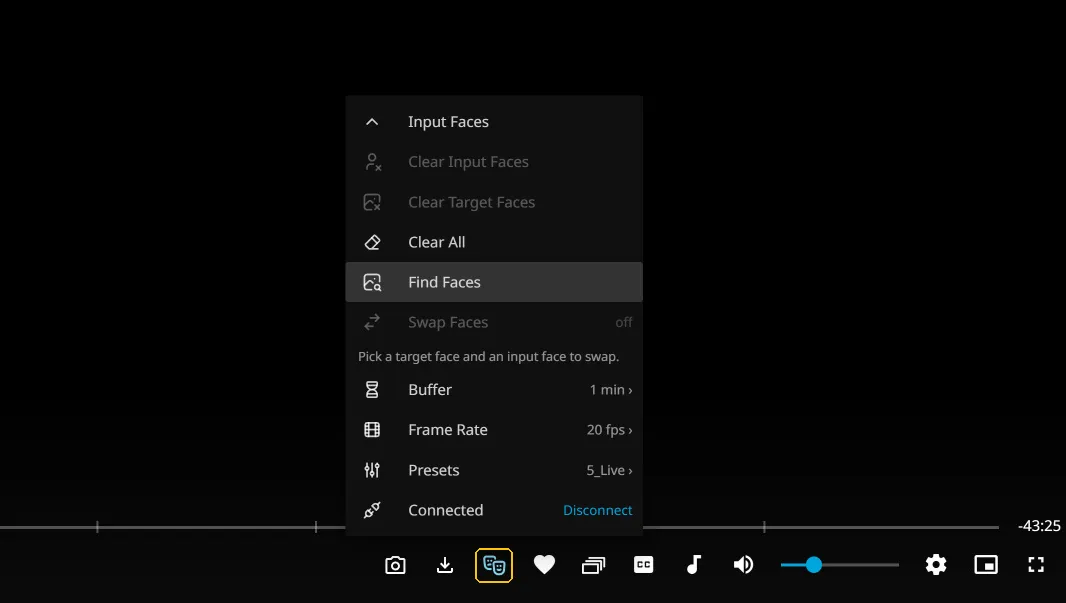
Nothing is stored. The film files stay as they are, nothing goes into the library, and faces and choices last as long as the player is open. The sound always comes from Jellyfin.
To set it up you install VisoMaster Fusion with its portable launcher and let it fetch its models, add the plugin from the catalog, then set the program path and the input folder on the admin page. It needs Windows, an NVIDIA card, and Jellyfin and VisoMaster Fusion on the same computer. The plugin does not contain or ship any part of VisoMaster Fusion, which is a separate program under GPL-3.0.
Three parts and one clock
There are three parts. A C# server part adds the script, keeps the settings, and starts and stops the worker. A Python worker runs on VisoMaster Fusion's own portable Python, with its models on CUDA and its own frame pipeline, so the frames match the original. The program has no headless mode, so the worker gives that pipeline a stand-in for the main window. It listens only on 127.0.0.1, and every request carries a token. A JavaScript part adds the button and lays a second video over Jellyfin's picture, fed through Media Source Extensions and held frame by frame to Jellyfin's clock.
The worker reads the film file itself from the current position, swaps each frame, encodes with NVENC where available, and streams picture without sound. If the card cannot keep up, the film plays slower instead of skipping, and the sound slows with it. That was a deliberate choice: slower, never out of sync.
Function first, speed last
Claude Code wrote the code. I set the goal, approved the concept and made the decisions. VisoMaster Fusion's code was read first and the concept written before anything else: function and wiring first, performance last. The first idea took the faces from VisoMaster's saved workspace. I changed that early, so faces are picked in Jellyfin, one to one like the original, and the workspace only gives the global settings.
Testing used simulations against the worker and a browser portfolio on a test server: real films in six formats, face-heavy passages found by a script, and drift measured on the frames actually shown. The button also has its own place in the sort list of VideoOSD Tweaks & Candy, so it sits wherever you want it among the buttons on the right of the bottom bar.
Memory, the overlay and speed
Three problems shaped the project.
GPU memory was the first. After a while it stopped working, because each swap restart ran the models from a new thread and ONNX Runtime keeps CUDA resources per thread. Memory climbed from 2.6 to 11.9 GB and frames took 35 seconds or more. One long-lived GPU thread running every model call solved it.
Feeding the overlay was the second. A plain video element stops loading when paused and cannot seek in a stream, so the film and overlay drifted apart and stalled. Pausing the film at once on swap start, and feeding through Media Source Extensions, fixed that for direct play and for transcoding.
Speed is the third, and it is a trade-off rather than a bug. The first 1080p path ran decode, swap and hand-off one after the other at 18 fps. A three-stage pipeline raised that to 27 to 29 fps in simple scenes, but bigger or more faces cost more. The result always depends on the settings in VisoMaster Fusion: better quality runs slower, near real time means lower quality. For real time you choose a faster preset there, or you let the buffer run ahead.
How close it gets to the original
- Worked: staying in sync. Drift stayed at a median of 5 to 29 ms, because the film slows down rather than the picture falling behind.
- Worked: SD material in real time.
- Worked: frames from VisoMaster Fusion's own pipeline, in place of an imitation of it.
- Worked: 1080p with a heavy preset reaches 0.6 to 0.9 times real time, and a faster preset or the buffer closes the rest. The GPU swap took 37 to 62 ms on the heavier test runs.
Source, releases and credit
The plugin is fully on GitHub under MIT: the source of the server part, the worker and the script, with releases for Jellyfin 10.10.7 and 12.0+. VisoMaster Fusion has its own open repository. Credit goes to VisoMaster Fusion, which does the actual swap, to the original VisoMaster by argenspin and Alucard24, and to Tabler Icons.
Connected
Next: Globe