Tree / Self Hosting / Movies & TV Shows / Jellyfin / VideoOSD
Playback Speed Buttons
One-click speed buttons during playback.
- Status
- Green · Published
- Type
- script
- Hours
- about 6
- Tokens
- about 2.6 M
Works alone with Jellyfin's 11 speeds, and picks up a custom list when the Playback Speed Menu is there.
In this article
Speed at one click
Changing the speed in Jellyfin goes through the playback settings menu. This script puts the same thing directly into the transport bar: one click up, one click down, and one click back to normal.
The three controls
You get two small buttons with a field between them. The left button steps to the next lower speed, the right one to the next higher speed. The field shows the current speed, and clicking it resets the video to 1x.
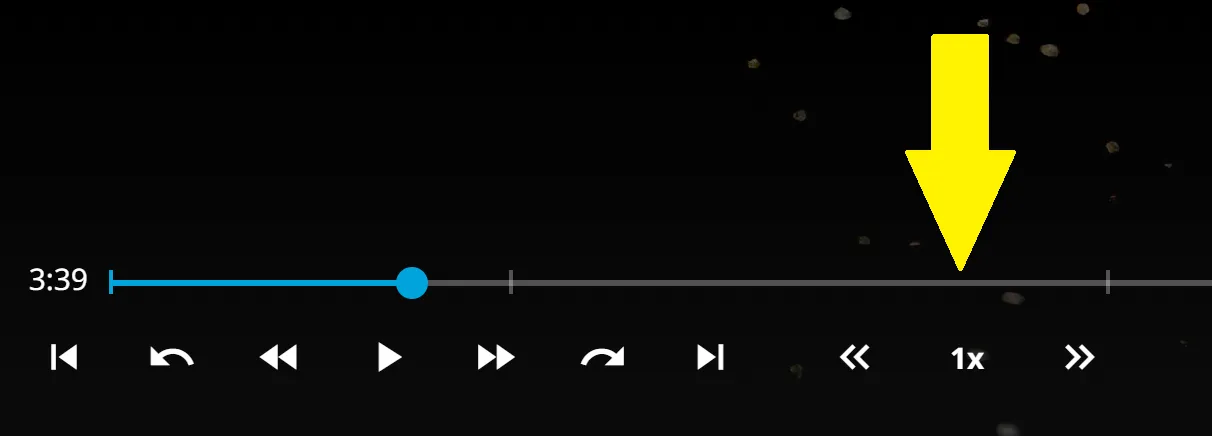
The field always tells you where you are, so you never need to open a menu to see the current speed. All three work during playback and need nothing from the server.
| Control | Action |
|---|---|
| Left button | Next lower speed in the list |
| Speed field | Shows the current speed, a click resets to 1x |
| Right button | Next higher speed in the list |
| Enter on the field (TV layout) | Resets to 1x with a remote |
Which steps exist depends on what else you run. If the Playback Speed Menu is installed, the buttons use its custom list automatically, so 0.33x or 10x become steps as well. If not, they use Jellyfin's 11 default values from 0.5x to 4x. Like Jellyfin's chapter buttons, they hide on narrow windows, and the On/Off Menu can switch them off during playback.
The buttons sit next to the playback controls in the transport bar, and with the three scripts together you get one list, edited in one place, reachable from the menu, the buttons and the keyboard.
With the example list of the Speed Menu, that means 17 steps from 0.1x to 10x instead of 11 from 0.5x to 4x, and the field always shows which one is active. A jump to 3x through a slow scene and back to normal costs a few clicks and no menu. Inside the plugin the list can also shrink: the vanilla speeds can be switched on one by one, plus your own values, so the same buttons can be cut down to the three or four steps you really use.
It changes the browser's playback rate only. No server setting changes and nothing talks to the backend, so the same limits apply as for the Speed Menu: very low values can get choppy, depending on the browser engine.
Almost nothing to set up
The script goes into an injector or userscript manager, and both companion scripts are optional. There is almost nothing to configure on its own. Two values sit at the top of the script:
| Setting | Default | What it changes |
|---|---|---|
hideOnNarrowWindow | true | Hides the control on narrow windows, matching Jellyfin's chapter buttons |
centeredGapEm | 0 | Extra space around the control in em. 0 keeps the normal small margin |
Inside the plugin both become admin settings. The gap can be set once for all or individually, so this control can be spaced evenly with the A-B Loop and Frame by Frame buttons. To define your own steps, edit the list in the Speed Menu and not here. Without it, the steps are 0.5x, 0.75x, 1x, 1.25x, 1.5x, 1.75x, 2x, 2.5x, 3x, 3.5x and 4x.
Making it look like it was always there
The player buttons should look as if Jellyfin shipped them. That turned out to be most of the work here, because these are details you only see once they are wrong. Claude sessions did this round of fixes, measuring in a real browser and taking values from the Jellyfin source.
The first sizes were guesses. The buttons were hard-coded to 3.2em, so the blue hover disc was visibly larger than on the native buttons beside them. I reported that, and the real size came from the Jellyfin source: about 2.78em. After that the disc matched.
The container was the less obvious half. It was fixed at 13.4em, but the content needed only 10.2em. The difference became invisible padding on both sides that no spacing setting could reach, and it only showed up in a measured browser render.
Input devices were the rest. Jellyfin's own speed keys know only Jellyfin's rates, so a block shared with the Speed Menu redoes each step through the custom list. On a TV remote the D-pad reaches only focusable elements, so in the TV layout the field takes focus and Enter resets the speed. A later version also keeps the speed for the next item, in the same place the Speed Menu stores it.
One version left outside
A user reported that the buttons do not appear on Jellyfin 10.11.11. The player markup they attach to is identical to 10.10.7, and no cause for that report was found. Jellyfin 10.11 is not a supported version, so the honest answer stays: built for 10.10.7 and 12.0+, and between the two I cannot promise anything.
Connected
Next: Playback Speed Menu