Tree / Self Hosting / Movies & TV Shows / Jellyfin / VideoOSD
Frame by Frame
Step through a paused video one frame at a time.
- Status
- Green · Published
- Type
- script
- Hours
- about 5
- Tokens
- about 2.1 M
A very fine seek and not a frame engine, and the README says so near the top.
In this article
Stepping through frames in a browser
Jellyfin's player has no frame stepping. The goal was precise stepping while paused, directly in the OSD, in the spirit of what a player like VLC offers.
That goal comes with an honest limit, and it stands near the top of the README: this is not a true frame-by-frame engine. It works within the limits of the Chrome and Chromium video engine. All the script can do is move the playback position by a calculated amount.
Two small buttons, one calculation
- A previous frame button and a next frame button in the video OSD
- Steps based on the real frame rate of the video that is playing
- An automatic pause before each step, so you never need to pause first
- The frame rate read once and cached for the current item
- A greyed-out state with an explanation if the rate is unknown
- A pure browser solution with no server changes and no backend interaction
From frame rate to step size
Two small buttons sit in the transport bar. The left one steps one frame back, the right one a frame forward. A click pauses the video first, then moves the position.
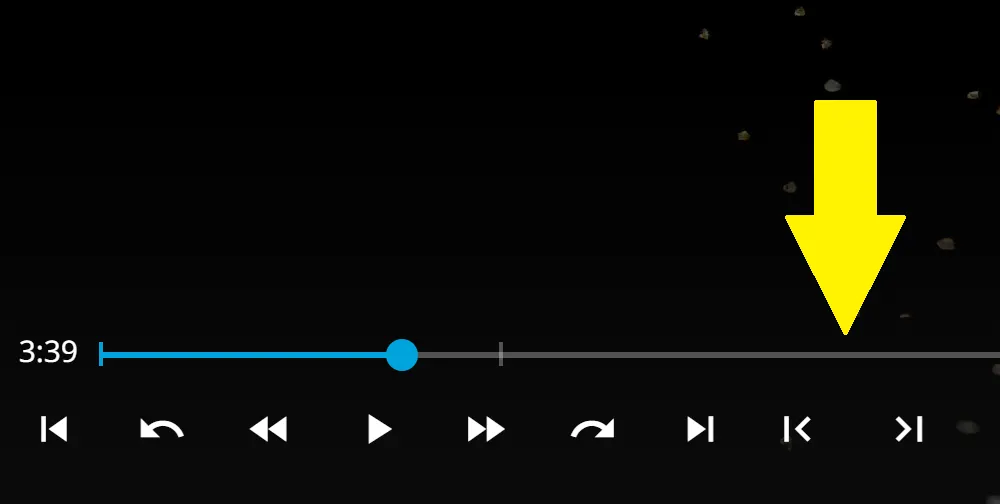
The step size comes from the frame rate of the current video:
| Frame rate | One step |
|---|---|
| 24 fps | about 0.0417 seconds |
| 25 fps | 0.04 seconds |
| 30 fps | about 0.0333 seconds |
The rate is read from Jellyfin and cached per item. If no rate can be found, the script does not step at all, because a blind jump would be inaccurate. The buttons go grey and the tooltip says "Frame rate unknown for this video".
With the On/Off Menu it registers as Frame Buttons and can be switched during playback. Without that menu it simply stays on.
Two values sit at the top of the script:
| Value | Out of the box | Meaning |
|---|---|---|
hideOnNarrowWindow | true | Hides the buttons on narrow windows, like Jellyfin's chapter buttons |
centeredGapEm | 0 | Extra space around the buttons in em. 0 keeps the normal small margin |
In the plugin both become admin settings, and the gap can come from one general value or from an override for this addon, so the row with Speed and A-B Loop stays even.
The buttons earn their place in a few situations: reading a title card, checking a cut, or finding the exact frame before pressing the Screenshot Button. With the A-B Loop next to them, you can also set a loop point on the frame you stepped to.
The trade-off
For clean frame rates like 30 fps, one click usually gives one visible frame. For rates around 23.976 fps, the step is calculated as exactly as possible, but the browser's seeking can still leave an empty click every few clicks: you press, and the picture does not move.
There is a possible workaround: raise the step multiplier slightly, from 1.0 to 1.1. But then real frames can get skipped. So the script deliberately prefers an occasional empty click over a skipped frame. The script depends on the frame rate Jellyfin reports for the item, and browser seeking can shift the exact position slightly, so treat it as a very fine seek rather than an editing tool. In a live test on the plugin, one click moved the video by one frame, +0.042 seconds, with no double step.
Native on the outside, measured on the inside
Claude sessions reviewed and tested the script against the Jellyfin source, and most of what they found was about layout. A hard-coded CSS rule added .25em on both sides, on top of whatever the spacing logic worked out, regardless of the configured gap.
The first fix for that went wrong in a way worth remembering. The explanation had been left as a // comment inside the CSS text, and that is invalid CSS. It could silently drop the very line it described. Earlier tests only checked the order of the elements, so only a real browser render showed it.
The button size was the last piece. At 3.2em the hover disc was larger than on native buttons. Taken from the source, the real size is about 2.78em, and the native margins had to be counted too, or the buttons overlapped.
The bug that came from games
Playnite Bridge brought game videos into Jellyfin, and on those the buttons did nothing and gave no reason. The session data the script read has no current item for those videos, so no frame rate came back and the script stayed silent. It now asks for the playing item itself first and uses the session only as a fallback. That change also brought in the grey state, so a missing frame rate now tells you what is going on.
Connected
Next: Playback Speed Buttons