Tree / Self Hosting / Movies & TV Shows / Jellyfin / VideoOSD
Screenshot Button
Single, rapid or automatic screenshots from the player.
- Status
- Green · Published
- Type
- script
- Hours
- about 13
- Tokens
- about 6.1 M
Works alone or through VideoOSD Tweaks & Candy, and a Firefox fork by Moelf adds a key and the clipboard.
In this article
A camera inside the player
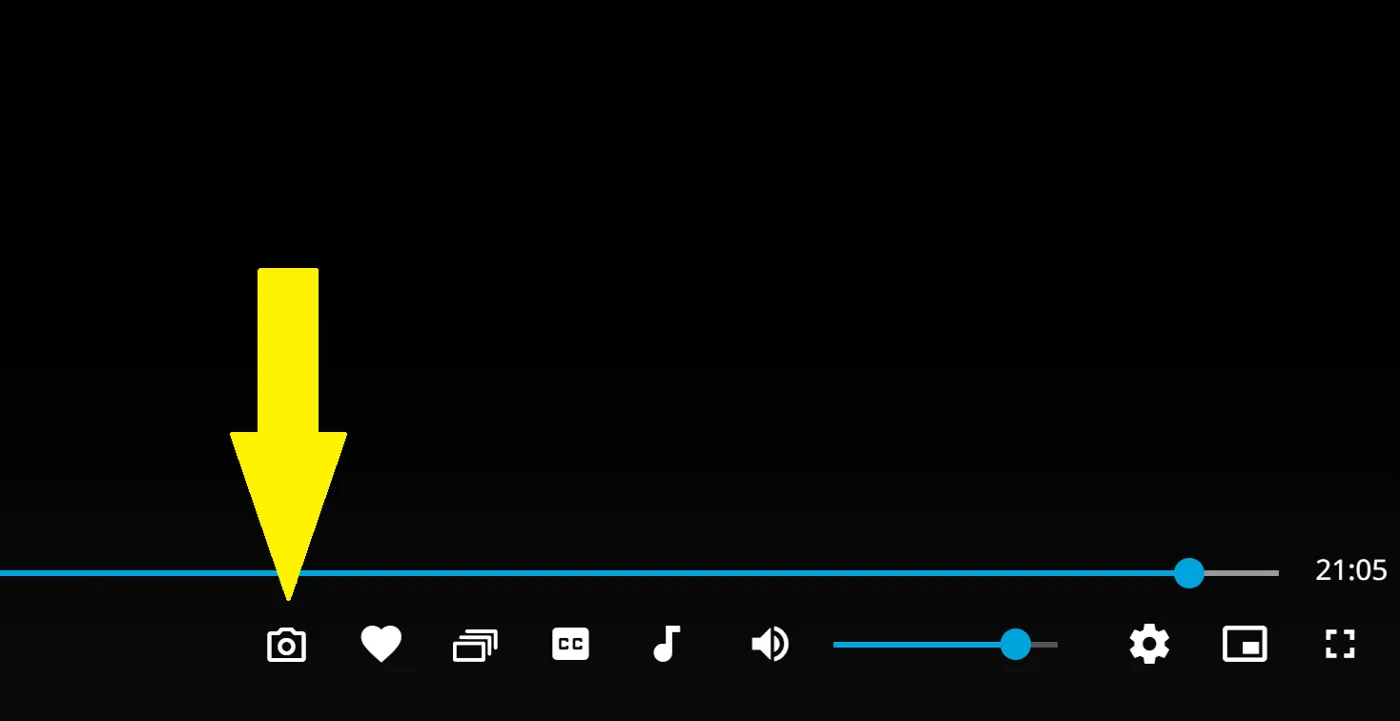
The goal was to take screenshots straight from the Jellyfin Web player, without leaving it. The script adds a camera button to the video OSD, next to the rating and favourite buttons.
One button, three ways to press it
- A single click takes one screenshot of the current frame.
- Holding the button shoots continuously, one picture every 0.2 seconds.
- A double click switches auto mode on, one picture every second.
Each of the three is a normal press on the same button, so there is nothing to learn beyond the rhythm. With a keyboard, Enter on the focused button takes a shot, and on a touch screen, holding a finger on the button starts rapid fire. Rapid fire is the mode for finding the one good frame in a fast scene. Auto mode is the mode for sampling a whole film without touching anything.
Auto mode ends with another double click, when you leave the video or when you reload the page. At the moment it keeps running through shuffle, playlists and autoplay. An earlier version reset it on every video change, so that behaviour changed along the way.
Technically the script draws the video element onto a canvas and exports it. Pictures go to your normal Downloads folder. Subtitles are the honest limit here: as far as tested, image subtitles such as PGS and VobSub appear on the picture, and text subtitles such as SRT do not.
Names that tell you what you shot
The default name follows the style of the Windows Snipping Tool and adds the title: Screenshot YYYY-MM-DD HHMMSS - title.png. Every colon in a title becomes a dash.
The title has nothing to do with the file name on disk. It comes from what Jellyfin knows, so the name is based purely on the database. TV shows get an experimental parser that splits the text into show, season and episode number, and episode title, as in Star Trek - Voyager - S07E21 - Friendship One. Later the script started asking the API first and only falls back to reading the page. It also stopped treating season 0 and episode 0 as missing, because specials are real numbers.
From one fixed behaviour to eleven switches
The script goes into the classic JavaScript Injector plugin or a userscript manager like Tampermonkey, and the camera appears in the OSD during playback.
The first versions had one fixed behaviour. Today the settings at the top of the script, or the admin page in the plugin, cover all of it:
| Name | Default | Effect |
|---|---|---|
fileFormat | 'png' | 'png' for lossless pictures, 'jpg' for smaller files |
filenameSource | 'library' | 'library' takes the name from Jellyfin, 'original' from the file |
includeYearMovies | true | Adds the year to film names |
includeYearEpisodes | false | Adds the year to episode names |
includeYearVideos | false | Adds the year to other videos |
filenamePattern | 'screenshot_timestamp_label' | Which parts the name is built from, see below |
rapidFireEnabled | true | Whether holding the button shoots repeatedly |
rapidFireIntervalMs | 200 | Time between rapid fire shots, in milliseconds |
autoModeEnabled | true | Whether a double click starts auto mode |
autoModeIntervalMs | 1000 | Time between auto mode shots, in milliseconds |
hideOnNarrowWindow | true | Hides the button on narrow windows |
The seven name patterns combine the word Screenshot, the timestamp and the title: screenshot_timestamp_label, screenshot_timestamp, screenshot_label, timestamp_label, screenshot_only, timestamp_only and label_only. Keep a timestamp in the pattern if you shoot in rapid fire or auto mode, because otherwise many pictures share one name and only the browser's numbering tells them apart.
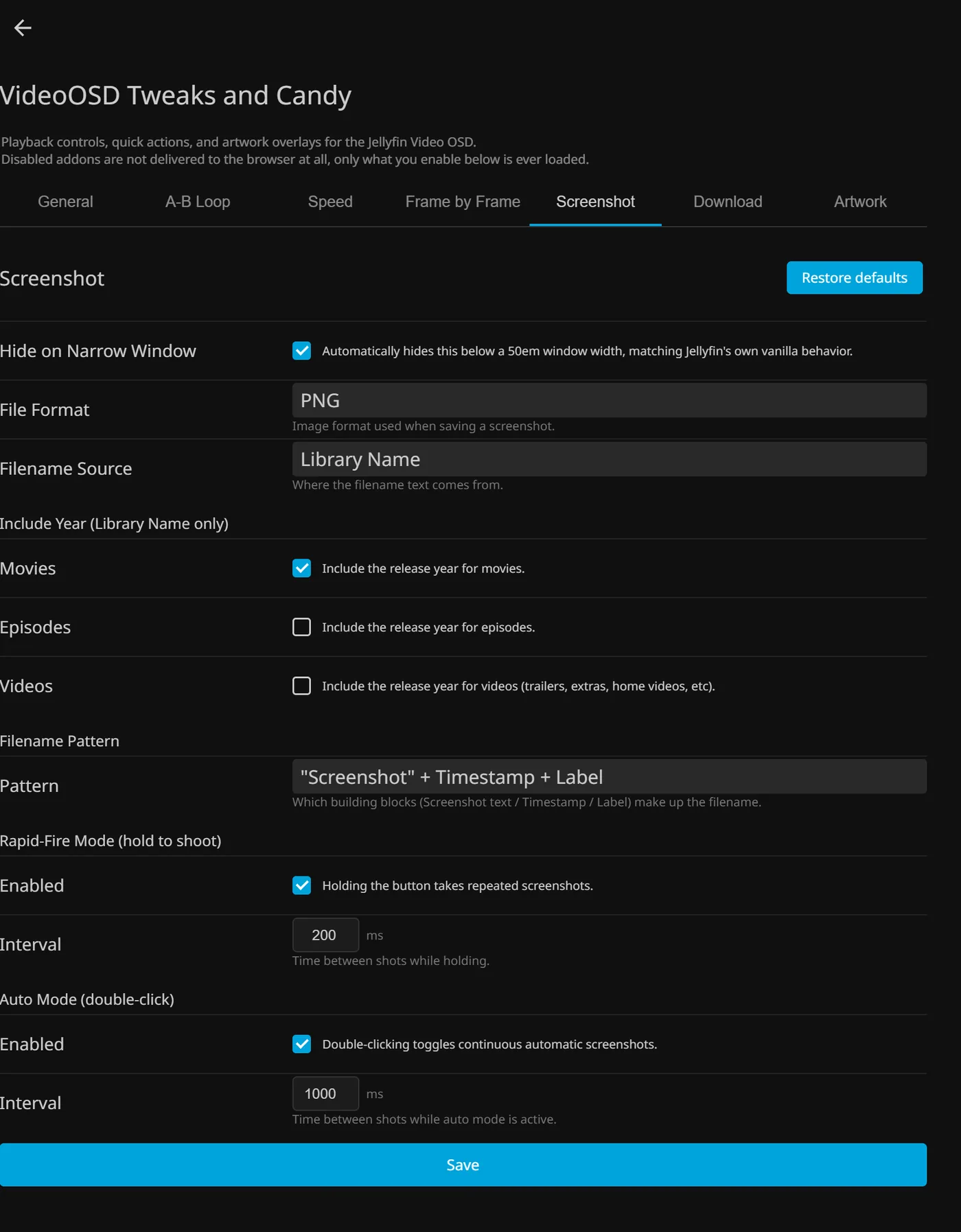
PNG suits the single frame you want to keep, and JPG suits a long auto mode run where the files pile up.
The button also appears in the On/Off Menu. On phones, tablets and TV devices it stays off unless a plugin setting allows it.
What came back from others
@Moelf published a Firefox fork that adds a C keyboard shortcut and copies straight to the clipboard, and it is linked at the top of my README.
A user reported that the icon showed only as placeholder text, in Jellyfin Desktop and in Firefox. The icon is now an inline SVG, so it shows there too. The Download Button had the same problem and got the same fix.
What the proper test found
The script grew more than fivefold, mostly for settings and for edge cases. Claude sessions reviewed it with full tests of the real scripts in real Jellyfin HTML, and the biggest finding was one nobody had seen from the outside. The plugin path called a function that did not exist in this file, even though a comment in the script referred to it. Format, name pattern, rapid fire and auto mode were all silently ignored. The Download Button had the identical bug.
Videos from another server were the second hurdle. They block the canvas export, so the browser refuses the picture, and auto mode repeated that error every second. Now the first interval shot that hits this stops the mode.
The third was speed. The name now needs an API call, and a screenshot that waits for the network misses the frame you wanted. So the frame is grabbed first and the file name is worked out afterwards, which keeps the capture itself instant.
Connected
Next: A-B Loop