Tree / Self Hosting / Movies & TV Shows / Jellyfin / VideoOSD
A-B Loop
Mark two points and repeat that section, like VLC's A-B repeat.
- Status
- Green · Published
- Type
- script
- Hours
- about 4
- Tokens
- about 1.8 M
Made for desktop browsers. The plugin can open it up for touch and TV devices.
In this article
Seeking back by hand, every time
If you want to repeat a short section in Jellyfin, you seek back by hand each time it ends. For rewatching a scene, practising along to a clip or studying a short segment, that gets tiring. VLC has an A-B repeat for this, and the goal here was exactly that, inside the Jellyfin player.
Click, click, loop
The button sits right after the native playback controls and shows the letters A and B.
- The first click sets point A at the current position.
- The second click sets point B, and the loop starts at once.
- The third click clears the loop and resets the button.
The letters light up in Jellyfin's own accent colour as each point is set. When you switch to another video, the loop resets by itself. There is no menu and playback never stops.
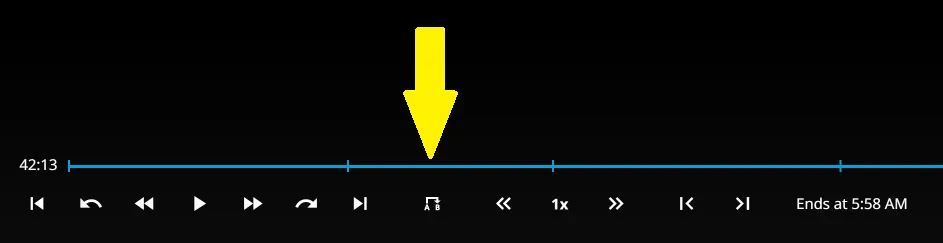
The tooltip tells you what the next click does: Set loop start, Set loop end, or Clear loop. If you click for point B at or before point A, nothing happens, so a loop can never run backwards. The loop only watches the position, so pausing and changing the speed work as usual, and you never touch the seek bar again. It works next to Speed and Frame by Frame without crowding the row.
The mechanism is simple. The script reads the position from the <video> element for both points, and a timeupdate listener jumps back to A once playback reaches B. A MutationObserver finds the transport bar and keeps the button in its place, even if other custom buttons load afterwards.
Both points are just times in the video, so a loop can be as short or as long as you like, and it runs until the third click or the next video. Frame by Frame makes a good partner here: pause, step to the exact frame, set the point, and the loop starts where you meant it to.
Fitting into a row of buttons
Three values sit in the CONFIG object at the top:
| Setting | Default | What it does |
|---|---|---|
spacingMode | 'balanced' | seamless if no other custom OSD buttons are installed, balanced if you use it with Speed or Frame by Frame |
symmetricExtraGapEm | 2.1 | the gap on both sides in em, in balanced mode only |
hideOnNarrowWindow | true | hides the button below 50em window width, like Jellyfin does with its own buttons |
If this is your only custom button, switch to seamless. If you run it in a row with the others, leave balanced and only touch the gap if the row looks uneven. Above those values sits activeColor, which colours the letters once a point is set. The On/Off Menu lists the addon as A-B Loop, and switching it off also clears a running loop.
Desktop browsers by default: mobile, TV and app wrappers are excluded on purpose. The plugin can switch it on for touch and TV devices, with an admin setting that is off by default.
The plugin version has a simpler spacing system, with a general gap and an optional override on this addon's own tab. The old math stays in the file untouched, so people using only the script see no change.
Two clicks, and the rest of the work
The loop itself was the easy part. The file nearly tripled in size mostly because of two things: living next to other buttons, and living inside the plugin. The plugin fixes came from Claude sessions.
Living next to other buttons meant that one spacing could not fit everything. Next to Speed and Frame by Frame the button needs different gaps than alone, which is why the two spacing modes and an offset calculation exist.
Living inside the plugin was harder. Jellyfin is a single-page app, and the script can run before Jellyfin's ApiClient exists. The first version gave up at the first try and used its defaults for the whole session, even with the plugin installed. It showed up in live testing as wrong margins while the admin page showed the right values. Now it retries for up to 30 seconds and waits quietly until someone is logged in.
The retry needed its own limit. A real error could send up to 120 requests in 30 seconds, so a 403 or 404 now stops at once, because retrying cannot change that answer, and other errors get three more tries at most. Of the addons finished at that point, this was also the one that did not store its own starting value before registering with the On/Off Menu, which was corrected to match the others.
The result is what it should be: two clicks, and the scene repeats.
Connected
Next: Frame by Frame