Tree / Self Hosting / Movies & TV Shows / Jellyfin / Library View
Fullscreen Button
A fullscreen button in the header.
- Status
- Green · Published
- Type
- script
- Hours
- about 5
- Tokens
- about 2.5 M
It does one thing: fullscreen from the header, in the same place in both directions.
In this article
Missing the Kodi feeling
I come from the Kodi ecosystem, where I spent a lot of time with skin XML files and convenience enhancements. Kodi is excellent for classic couch use. Jellyfin caught my interest as a powerful alternative for work and multitasking that still works on the couch, and controlling the whole library from a browser is extremely convenient.
I mainly use Jellyfin on Windows 11 in Chrome, on the same machine that runs the server. From time to time I want to switch into a more immersive cinema mode and get that familiar fullscreen feeling. And that is where it got awkward:
- F11 is technically simple, but I mostly use a 61-key keyboard, and switching layers just to reach it is inconvenient.
- On the couch I often have no keyboard nearby at all. Most things happen by mouse, and if needed with the Windows on-screen keyboard.
- Chrome's menu means moving to the top right, opening the three-dot menu and clicking the icon at the bottom. Leaving fullscreen means moving to the top centre to reveal the exit button.
Chrome extensions with a fullscreen button helped a little, but the paths stayed different enough that no muscle memory formed.
The solution: one button that never moves
The final answer was a toggle in Jellyfin's top bar, on the right near the SyncPlay icon. Same place, every time, for going in and out. That is all it does, and that is the point.
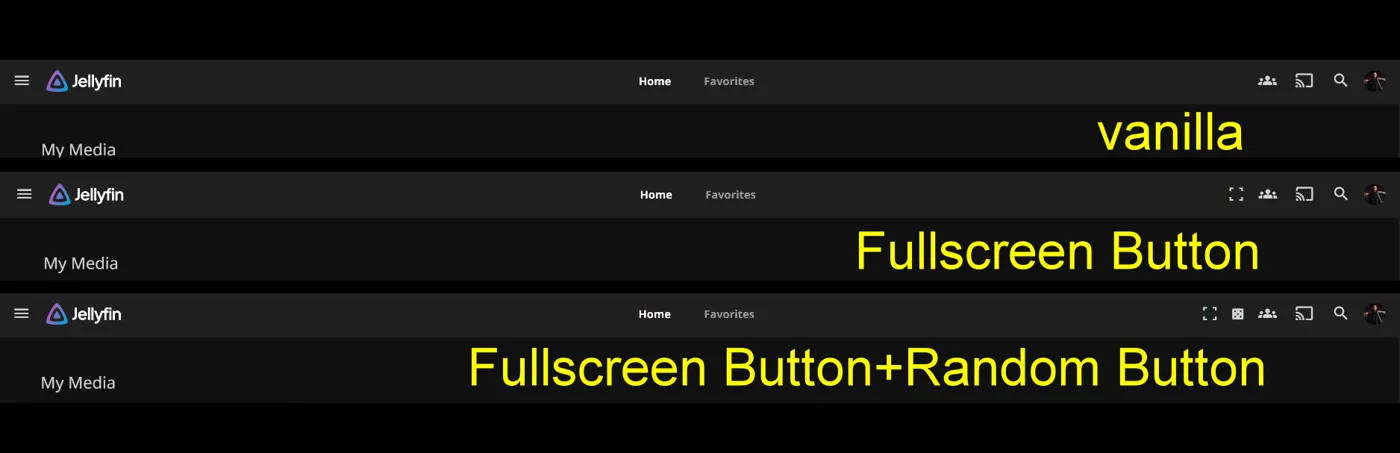
The behaviour fits in a few lines:
- One click enters fullscreen, the next click leaves it.
- The icon shows the current state and stays correct after Esc or when the player leaves fullscreen by itself.
- The button looks and reacts like the native header buttons, in the classic header and in the new toolbar of Jellyfin 12.
- It sits in a fixed place next to my other header buttons.
- There are no settings, nothing to configure and no server interaction.
With the mouse alone, it turns switching between windowed and fullscreen use into one short move to the same corner, in both directions. That is what the three-dot menu and the top centre exit could not give me.
With the Random and Autoscroll buttons in the same row, a couch session can run from one corner of the header without a keyboard anywhere in reach.
It runs only on Windows browsers, which is where the problem existed in the first place.
What it can and cannot do
There are several fullscreen modes, and my research showed that a script can only reach the simple one. Security restrictions prevent injected JavaScript from triggering Chrome's own fullscreen from the three-dot menu. My README describes the button as emulating F11. In the current code it uses the browser's Fullscreen API on the page, which is a separate thing from F11 browser mode.
That has a side effect. If you start a video in this mode and the video goes into its own fullscreen, you land back in a window when it ends. It has advantages and disadvantages. It is not ideal, but it is a workable solution.
The fight over the button order
The other hurdle was the order of the buttons. In my setup the shuffle button always forced itself to first place, whatever I tried. Changing that meant editing both scripts or merging them, and neither was a real solution. In the end I stopped fighting it, and the README still asks if anyone knows a clean way.
For my own scripts that was solved later. Random, Autoscroll, Fullscreen, Cinema and Destroy now share one fixed order.
Other people's header buttons still go where they want, so the README keeps its question open.
Small script, big port
The script is about six times the size of its first version, and very little of that is about fullscreen. Claude sessions did this work.
Most of it went into looking native. The button now uses Jellyfin's own header classes, and measured against Search and Cast it had the same computed style and the same 41.37 pixel circle. An inline SVG icon replaced the Material Symbols font, which showed as plain text when it could not load. One script now serves two Jellyfin generations: a shared compatibility block decides from the page itself whether the classic header or the new toolbar is showing, because 12.x keeps a hidden classic header in the page. Without it the button was invisible on 12.1.
Two approaches had to be replaced on the way. requestAnimationFrame does not run in background tabs, so the button was missing until the tab was shown, and a timer took over the placing. A timer was the wrong tool for the icon state, though. The icon now follows the real fullscreen event, so it stays right after Esc or when the player leaves fullscreen by itself.
Also part of Essentials
This script now also runs inside my Essentials plugin, with its settings on a normal dashboard page instead of values at the top of the code. On its own, through the JavaScript Injector, it works as before.
Connected
Next: Autoscroll Button