Tree / Self Hosting / Movies & TV Shows / Jellyfin / Experience & Ambience

Globe
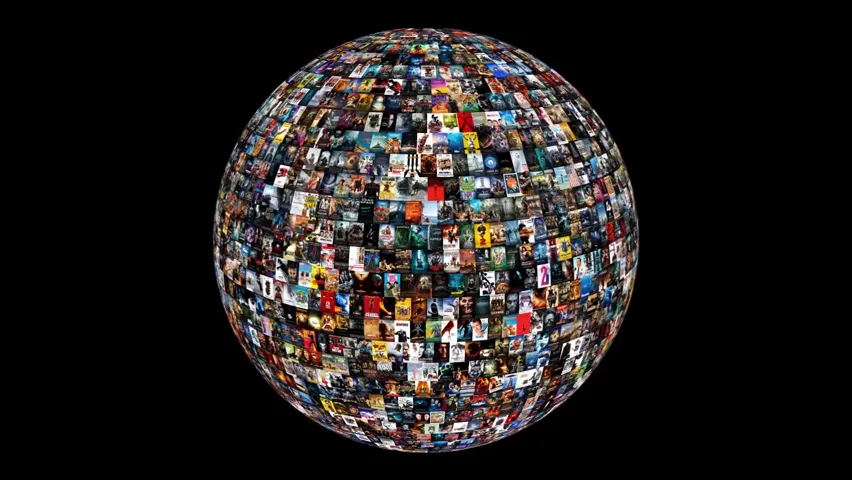
The library as a 3D globe of artwork inside Jellyfin. A double click opens the film, series, photo or game in Jellyfin itself.
- Status
- Green · Released
- Type
- plugin
- Hours
- about 3
- Tokens
- about 0.6 M
Released on GitHub for Jellyfin 10.10.7 and 12.0+, and tested live on real servers with real libraries.
In this article
The whole library as one object
The goal is easy to say: a Jellyfin plugin that shows the library as a three.js globe. First one image type, later mixed, films and series together. It should start inside Jellyfin, you fly around it, and a click on a tile starts the item in Jellyfin's native player as an overlay, not in a new tab.
Jellyfin was not made for this, in three ways. There is no user-side place for a plugin, because plugin pages only appear in the admin drawer, so the entry has to be injected script. There is no global way to start the player from plugin code. And its image cache cannot serve a whole library at once. A view of everything needs every tile at the same moment, and my library has 24,928 backdrops alone. Those requests would take minutes even from cache, and would decode to about 0.9 GB.
What it is meant to do
A button in Jellyfin's header opens a full-screen layer over the current page, with only an X on it. You move around the globe with Google-Earth-style controls, and it snaps to tiles. Double-clicking a film does what the admin chose: open the detail page, play the film or play the trailer, with a fallback when there is no trailer. Series, seasons and collections open their view in Jellyfin. After the player or the detail page, the globe comes back as you left it. If there are several globes, a tab under the X opens a side menu to switch between them. Esc closes the menu first and then the globe.
The globes are made in the admin page, in a globe builder. You create named globes, and for each one you choose libraries, one or more of seven artwork kinds, a sort, an order, a start point at the front or the north pole, and a colour. Sorting uses Jellyfin's own options plus a Random of its own. A status line shows progress per globe, and a daily task can keep them up to date. Rights are respected: a globe stays hidden from anyone who may not see all of its libraries, and a user with no visible globe gets no button at all, while admins always see it.
Stop asking Jellyfin for images
The trick is to stop asking Jellyfin for images while you look at the globe. A build task prepares compressed texture atlases in advance. Each image is prepared once in a shared store and reused by all globes. An unchanged globe is not rebuilt, and a rebuild swaps in atomically.
The hardest layout problem was mixing shapes. Posters, backdrops, logos and discs all have different proportions, and a sphere has rings of different lengths. The answer is a column mosaic: each ring is split into columns, and the images in a column share one width, so any mix of aspect ratios closes without gaps.
Opaque images use BC1 compression. Transparent ones use BC3 with premultiplied alpha, so logos keep their soft edges. The globe colour is a shader value, so changing it needs no rebuild. Selection goes through Jellyfin's own query and not through SQL, because version 12 has a different database.
Study, prototype, plan, build
One Claude Code session wrote the study, prototype, plugin, plan and checks, following the same conventions as my other plugins. I set the goal, decided the plan and gave each go-ahead.
The order was study, prototype, plan, build. The study read the Jellyfin 10.10.7 source, my real library database read-only and the image cache, and answered four questions: is the cache enough, separate tab or not, how to start the player, and what could be reused. A prototype in Python and three.js then showed 2,643 real posters on a sphere. In a click trial on a test server, with the script injected into one browser tab only, film, trailer and detail page all opened and the globe returned unchanged. That trial settled how to start the player, and the clean route turned out to be Jellyfin's official remote command to its own session.
A first plugin followed the ArtworkPlus model, with File Transformation injection, a controller and a C# port of the Python pipeline as a "Build Globe" task. Then the idea grew from one poster globe into a builder. We talked that through point by point and wrote every decision down before anything was built.
Checks ran offline. A data check compares the C# output with the Python pipeline, and a preview server imitates the plugin's routes with stand-ins for Jellyfin's client objects, so the browser could test the interface without a server.
What the offline tests settled
- Worked: the click trial, in the prototype, for film, trailer and detail page.
- Worked: the port to C#. The grid matched Python, and 600 of 600 compressed blocks were byte-identical.
- Worked: build speed. All real posters took 75 seconds, and an unchanged rerun was skipped in 6 ms.
- Worked: the mosaic, from 1 to 40,000 tiles in offline tests.
- Ruled out on paper: Jellyfin's image API for the whole globe, kept only as an option for close-ups.
- Ruled out on paper: a separate browser tab. It would be simpler, but it cannot host the native player.
- Ruled out on paper: BC1 for everything, because its on/off alpha would fray soft logo edges.
- Dropped: an organic arrangement by folder. It is not a Jellyfin sort, and I chose Jellyfin's sorts plus Random.
- Partly: small globes. They work, but single rings can stretch up to about 20 %.
Meeting a real Jellyfin
The offline stage ended where the earlier projects had taught me surprises start, so the next step was real servers. The plugin went onto two test instances with real media, one on Jellyfin 10.10.7 and one on 12.1, and onto two small ones with home videos and photos. One source builds two releases, one for each line, and the port to 12 is done.
On those servers the whole chain worked: the admin page with its globe builder, backup and import, the "Build Globe" task with real libraries and its progress, compacting the image store, and the header button, closing with X, Esc or Back, and the side menu for several globes. The return after the player, the detail page and the photo viewer works. Rights hold per user: age limits, the lock on unrated titles and library access. A games globe survives a server restart, and a sleeping drive does not empty a globe.
Real use also grew the plugin. Double-click now follows a table per item type: a film can open its detail page, play, or play a local or online trailer, and series, seasons, collections, home videos, photos and games each get their own action. Photos open in Jellyfin's photo viewer. Home videos and photos come with a folder choice, backdrops can be picked by number, and every globe has its own age limit. Black bars are removed, and images can be fitted by crop, their own shape, a blur fill or an adaptive mode. Animated WebP and GIF images play on their tile, rings are offset so no seam runs through the globe, and each globe can update itself. Games come in through my Playnite Bridge plugin, with versions, collections, age ratings, and a double click to the detail page, to play, or to open the game in Playnite.
Measured in Jellyfin: a poster globe with 2,643 films, a games globe with 1,518 tiles, and a mixed globe of films and games with 4,161 titles. Testing ran in Chrome on Windows 11.
What did not make it
- Dropped: sorting by playback, like last played or play count. A globe is a snapshot, and those sorts would go stale at once.
- Limit: it needs a desktop browser with WebGL 2, S3TC textures and 16,384 pixel textures. On other devices the button does not appear.
- Limit: Jellyfin Web only. Apps that do not use the server's web page do not show it.
- Limit: the first build of a large library takes time, because every image is read once.
Released
For me the globe is a success. My whole library sits on one world, it runs smoothly, it looks great, and flying around it feels like turning a real globe.
The globe is public on GitHub under MIT, installable from a plugin repository or by hand, and it needs the File Transformation plugin by IAmParadox27. Credit goes to three.js r160 under MIT, and to the Jellyfin artwork under CC BY-SA 4.0 for the logo on the poles.
Connected
Next: VideoOSD Tweaks & Candy