Tree / Self Hosting / Movies & TV Shows / Jellyfin / Library View
Details Sets
Links a film to its Box Set from the detail page.
- Status
- Green · Published
- Type
- script
- Hours
- about 2
- Tokens
- about 1.1 M
One row that links a film to its Box Set, and it knows the rows of Details Extended.
In this article
From a film to its collection and back
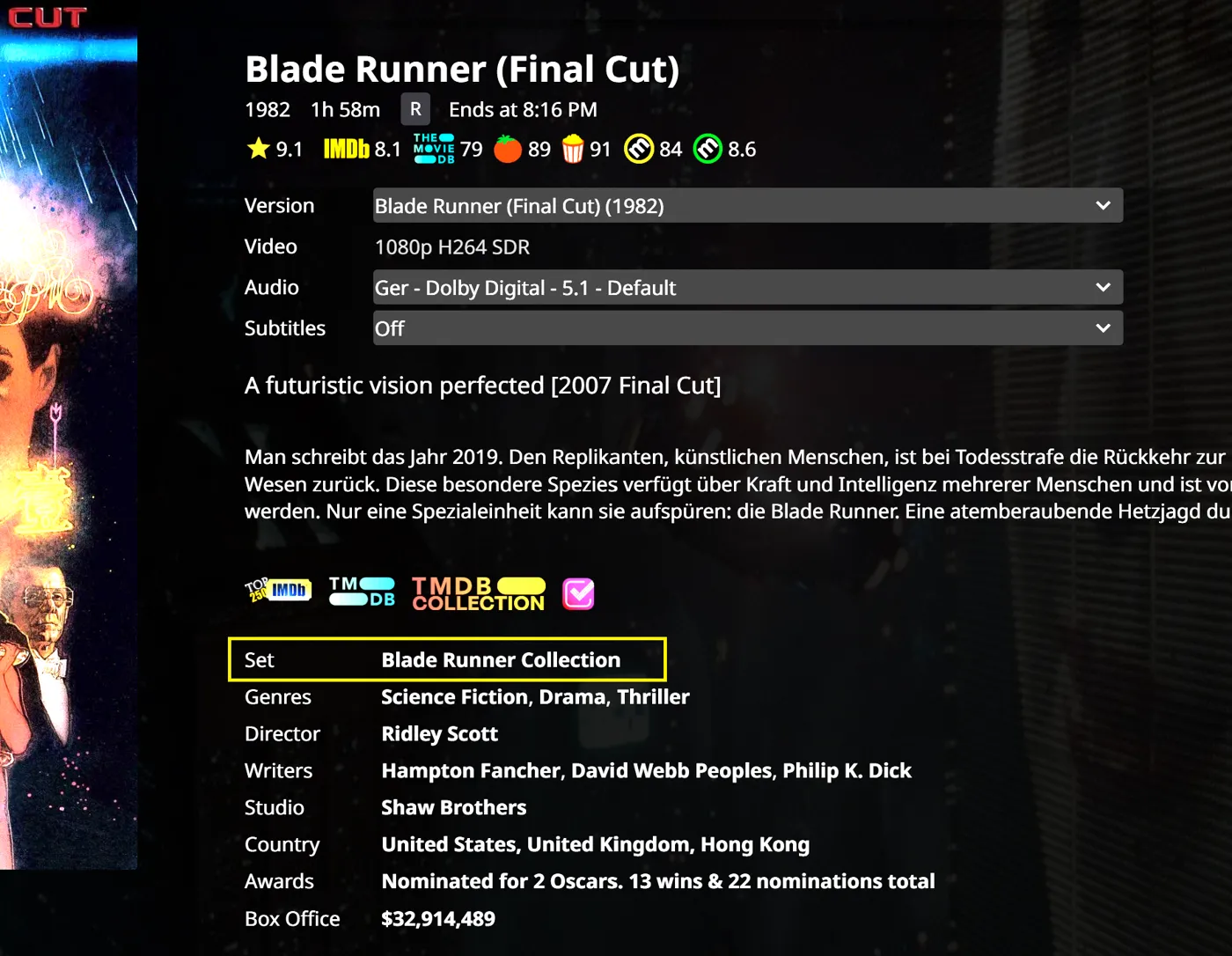
One practical feature is missing from Jellyfin: going quickly from a movie to its Collection or Box Set and back again. This script closes that gap with one row in the details block, next to Genres, Director, Writer and Studio. Click the name and you are in the Box Set.
What it needs and what it shows
The row appears only when the movie belongs to an existing Jellyfin Box Set, and that needs a valid TMDb collection link in the movie's metadata. Movies outside a collection simply show nothing. Like the Country and Awards rows of Details Extended, it is meant to be indistinguishable from the native rows: same font weight, spacing, hover and link style.
Label, place and a name that can change
Everything sits in the CONFIG block at the top:
| Value | Out of the box | Meaning |
|---|---|---|
labelText | "Collection" | The word in front of the name |
position | "top" | "top", "after" or "end" |
afterLabel | "Studio" | Which row it follows, used only with "after" |
enablePhraseParser | false | Switches the name replacement on |
phraseParser | Filmreihe to Collection | The list of replacement rules, each with from and to |
debug | false | Writes extra messages to the browser console |
Label. The row can be called anything: Collection, Set, Saga, Film Series.
Position. At the top, at the end, or after a chosen row: Genres, Director, Writer or Studio. If Details Extended is installed, it can also go after Country, Awards or Box Office. Those two scripts know about each other for exactly this reason.
Name replacement. This is the unusual one. TMDb set names come in the language you scraped them in, so a library can hold a mix of "Filmreihe", "Saga" and "Colección". Optional rules swap those words for display, for example Alien Filmreihe to Alien Collection. It only changes the text on screen and touches neither Jellyfin's metadata nor the Box Set names. It is useful when sets were scraped in one language and should be shown in another. Other examples are Twilight Saga to Twilight Filmreihe and Rocky Colección to Rocky Saga. A rule replaces the phrase wherever it appears in the name, and you can add as many rules as you need. The feature is off by default, so remember to enable it.
Navigation. The name is a real link into the Box Set. From there Jellyfin shows the other films of the collection, so you can go from one film to the set and on to the next. The row is built only for movies.
A good starting point is the default at the top of the block, because a collection is the first thing you want to see when a film belongs to one. If you prefer the row to stay with the people and studios, use "after" with "Studio".
Together with Details Extended the block can read Genres, Director, Writer, Studio, Collection, Country, Awards and Box Office, in whatever order you set, and every added row looks as if it had always been there. They are two separate scripts: one needs an OMDb key, and this one only needs what Jellyfin already has.
One row, two very different pages
The idea never changed. The code doubled. Claude sessions ported it to Jellyfin 12, and an audit with a counter-audit went through it against the source of both versions.
Version 12 changed the ground under a single line of text. The old request header got a 401 and the row stayed away, until the standard Authorization header replaced it. In 10.10.x the native rows are direct children of the block, while in 12.x each one is wrapped in a React root, so the row now goes after that wrapper and never inside it. Labels there have their own line height, and the row sat 2 pixels lower until the metrics were copied, the same fix as in Details Extended.
Finding "Studio" by its text was a trap in any version, because that depends on the interface language and on singular or plural. The search now tries the exact text, then singular and plural, then the kind of row, whatever the language.
The audit also found a privacy problem. The index of collections was not kept per user, so another user in the same tab could see the previous user's collections. It now belongs to one user on one server. An unsuccessful call used to read as "no collections" and now counts as an error that is retried later.
Living with Details Extended needed its own care: that script appends its rows when it rebuilds them, so positions "after" and "end" are checked again each time. A short memory of recent items brings the row back without a server round trip when you return to a page. To the viewer the row looks the same on both versions.
For a single line of text on a page, that is a long story. It is also a fair picture of what the move to Jellyfin 12 meant for small scripts.
Also part of Essentials
This script now also runs inside my Essentials plugin, with its settings on a normal dashboard page instead of values at the top of the code. On its own, through the JavaScript Injector, it works as before.
Connected
Next: Random Button Extended