Tree / Self Hosting / Movies & TV Shows / Jellyfin / Library View
Details Extended
Adds country, awards and box office rows from OMDb to detail pages.
- Status
- Green · Published
- Type
- script
- Hours
- about 6
- Tokens
- about 2.7 M
Needs a free OMDb key. Every row can be renamed, and switched off or reordered separately for movies and TV.
In this article
Three more rows in the details block
Jellyfin's details block shows Genres, Directors, Writers and Studios. Country of origin, awards and box office are not there. The goal was to add those three rows from OMDb and make them indistinguishable from the native ones: same font weight, same underlines, same hover, same behaviour.
What you see and what you can change
On a movie page you can get Country, Awards and Box Office. On a series page you can get Country and Awards, on the main level only, not on seasons or episodes. Box office is for movies only.
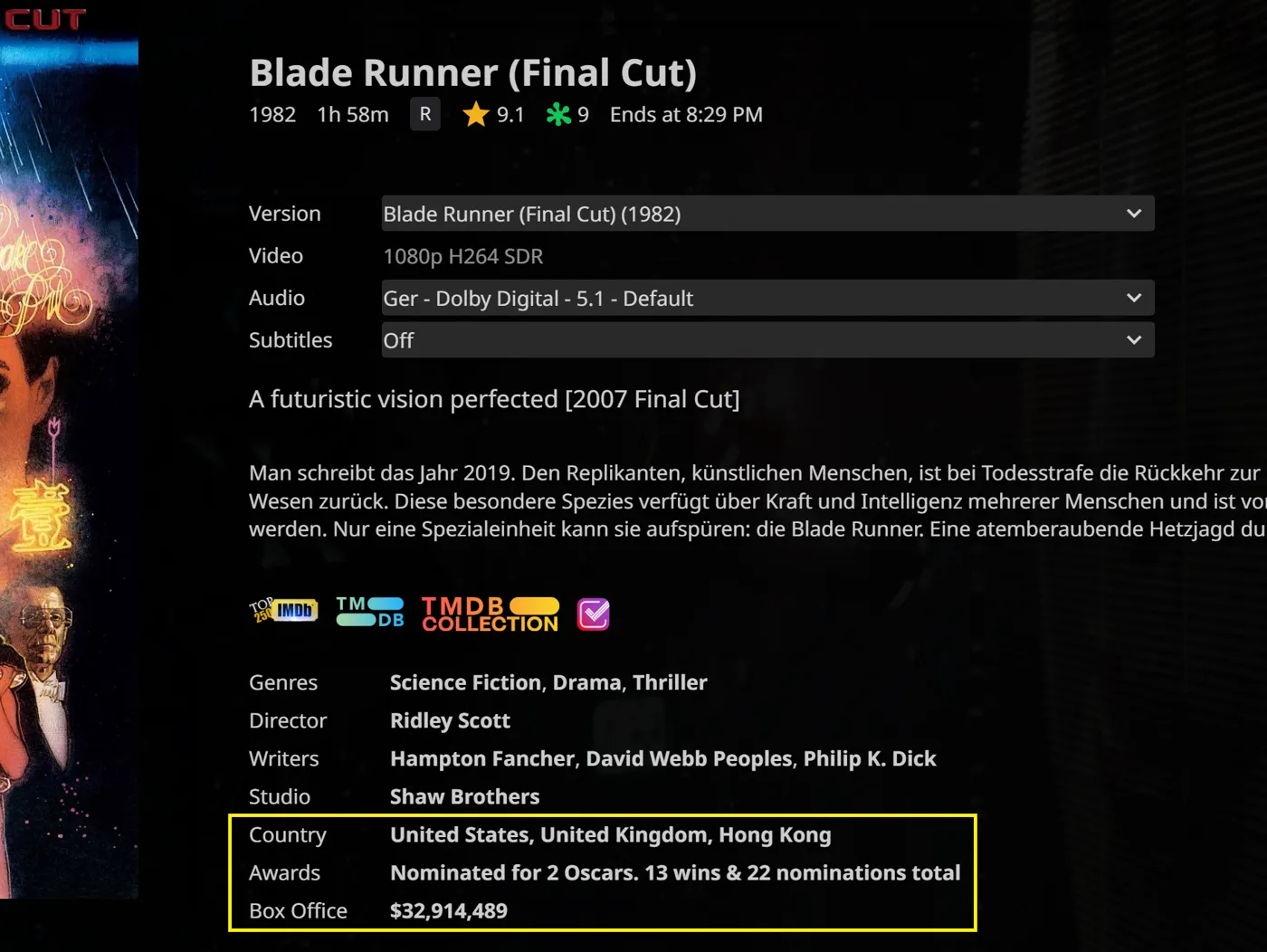
All settings sit at the top of the script, in a block for movies and a block for TV shows, plus the labels:
| Option | Ships as | Effect |
|---|---|---|
enableCountry | true | Shows the country of origin |
enableAwards | true | Shows the awards text |
enableBoxOffice | true | Shows box office data, movies only |
enableClickableLink | true | Makes the values clickable, separately for movies and TV shows |
awardsLinkSourceMovies | "imdb" | Where a click on Awards goes for movies: "imdb" or "tmdb" |
rowOrder | ["country", "awards", "boxoffice"] | The display order, also separately per type |
labels | Country, Awards, Box Office | The text in front of the values, so German users can write "Land" or "Auszeichnungen" |
Each row is independent. A disabled row, or one you leave out of rowOrder, is removed completely and not just hidden. The order can be anything, for example awards first, then box office, then country. The first row is placed after the last native row, so after Studios, Writer, Director or Genres, whichever are there.
The labels are plain text in the settings, so a German interface can read Land and Auszeichnungen without touching the code. Because the TV block is separate, a series can show Awards first while movies keep Country on top. The awards row shows the text OMDb delivers for the title, and the box office figure is the domestic one, which is what the first issue on the repo asked to change.
With links on, a click takes you to the right page: Country to the IMDb locations page, Awards to the IMDb awards page or, for movies, to the TMDb one, and Box Office to Box Office Mojo. The script works out the targets from the provider IDs Jellyfin already has.
OMDb answers are kept for a day in the browser session, so moving around a library does not burn your quota, and after a failed answer such as a wrong key or the daily limit the script waits ten minutes before it asks again.
You need your own free OMDb key, which allows 1,000 requests a day, and it goes into the same block as the settings. Details Sets knows these rows and can place its Collection row relative to them.
What users asked for
Three issues were reported on this repo.
Damocles-fr asked for worldwide box office, because OMDb only delivers the domestic figure, and shared his own version with a TMDb lookup. It would be possible, but not with OMDb. To keep the script simple and on one source it stays as it is, and I point people to his fork for worldwide numbers.
He also found that the external links got stuck on the Android app: the page opened inside Jellyfin and the back button did nothing. His hint was to use Jellyfin's own link button, and that fixed it. The app now hands the link to the system browser.
The third report was simple: on version 12 nothing showed. At that point the script was written and tested for 10.10.7 only. It now supports 10.10.7 and 12.0+.
The port to Jellyfin 12
The port, and a full audit with a counter-audit of the script, came from Claude sessions working against the Jellyfin source of both versions on separate test servers. The script more than doubled, and the hurdles were all in how much version 12 changed underneath the same screen.
The old login header went first. Jellyfin 12 ignores it unless legacy authorization is switched on, so requests were refused. The standard Authorization header works in both versions.
The look was next. In version 12 the native labels are different elements with their own line height, and our rows sat 2 pixels lower until those metrics were matched. Worse, version 12 empties the block on every render and React fills it again, so rows rebuilt on the normal scan flickered. They now return inside the observer, before the next paint.
The quota needed protection too. A lookup that came back with nothing started a new request on every page change, which burns a daily limit, so unsuccessful lookups now wait, and person and episode pages cost no OMDb requests at all. Recently shown items keep their rows for a few minutes, so going back to a page needs no round trip. On the TV layout Jellyfin shows no external links, so these rows stay plain text there too.
Also part of Essentials
This script now also runs inside my Essentials plugin, with its settings on a normal dashboard page instead of values at the top of the code. On its own, through the JavaScript Injector, it works as before.
Connected
Next: Details Sets