Tree / Self Hosting / Movies & TV Shows / Jellyfin / More Tools
MKV Subtitle Extractor & Parser
Extracts all subtitles from MKV files into correctly named Jellyfin tracks.
- Status
- Green · Published
- Type
- script
- Hours
- about 15
- Tokens
- about 6.9 M
A standalone Python script on MKVToolNix that names every subtitle track for Jellyfin, tested on 2,500 files.
In this article
Three worlds of subtitles in one folder
MKV files often hold several subtitle tracks that share a language, flags or other properties. Extract or rename them carelessly and Jellyfin shows them in a confusing order. On top of that, subtitles come from three places: inside the container, collected by hand from releases, and downloaded through OpenSubtitles. Those downloads can overwrite what is already there.
The goal was to pull every track out of the MKV files and let all three sources sit side by side, correctly named, in a stable order, with nothing overwritten. It is a standalone Python script built on MKVToolNix. My first versions were made with ChatGPT, and the README still says that adjusting the code with AI is simple even for beginners.
A file name that carries everything
The heart of the tool is a strict naming convention:
(basename)[.default][.(lang)][.(hi)][.forced].Extracted[(counter)].(ext)
| Part | Meaning |
|---|---|
(basename) | The video file name without .mkv, which ties the subtitle to its video |
.default | The track is flagged as default |
.(lang) | The language code, normalised through the mapping file |
.(hi) | Hearing impaired: hi, sdh or cc, taken from the track name |
.forced | The forced flag, or a track name containing forced, only or foreign |
.Extracted | The source tag for tracks from the container |
(counter) | Only for tracks that would otherwise have the same name |
.(ext) | .srt, .ass, .sub with .idx, or .sup, depending on the codec |
The order of those parts is not decoration. The default flag comes first so Jellyfin can pick the main track. The language follows as a code Jellyfin parses reliably. HI or SDH stays next to the language, then the forced flag, then the source tag.
The source tag does a job of its own. Jellyfin does not parse custom flags, it shows them exactly as written, so .Extracted marks tracks from the container and capitalised .External marks collected ones. OpenSubtitles downloads keep plain default naming with no tag. So one folder can hold Movie.en.Extracted.srt, Movie.de.cc.External.srt and Movie.default.en.forced.srt, and in the interface you can see where each one came from.
Only one custom flag is allowed per file, and .Extracted can be removed from the code if you do not want it. Embedded tracks stay in the MKV as the base layer, and nothing is removed from the file.
The result in Jellyfin is a consistent order: default tracks first, then the other languages, HI and SDH tracks, and forced tracks.
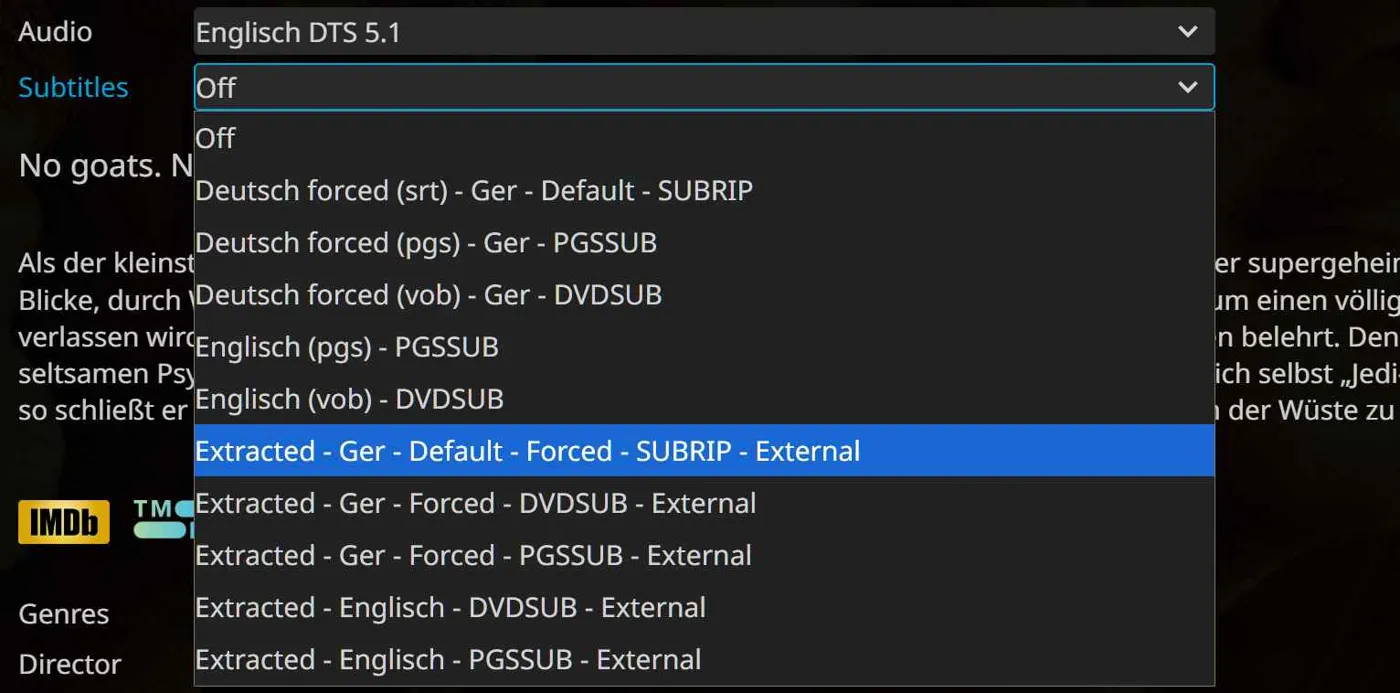
Some typical results:
| File name | Track |
|---|---|
Movie.default.en.Extracted.srt | Default English |
Movie.en.cc.Extracted.srt | English, hearing impaired |
Movie.en.forced.Extracted.srt | English, forced |
Movie.forced.Extracted.srt | Forced, no language data |
Movie.default.en.hi.Extracted.srt | Default English, hearing impaired |
Movie.pt.Extracted1.srt | Second Portuguese track |
Movie.Extracted.srt | No data at all |
Movie.Extracted1.srt | No data at all, several tracks, the worst case |
Movie.en.Extracted.sub and .idx | English VobSub |
Movie.en.sdh.Extracted.sup | English PGS, hearing impaired |
Movie.default.en.forced.Extracted.sup | Default forced English PGS |
Movie.en.sdh.External.sup | Collected from a release, not from the container |
Movie.de.forced.sub and .idx | Vanilla naming from a subtitle addon, no tag |
The counter exists because of a Jellyfin limit. Sublanguages such as pt-br are not supported, even though this has been widely requested. So two Portuguese tracks become Movie.pt.Extracted.srt and Movie.pt.Extracted1.srt, numbered by track ID, which is the only reliable fallback. It comes up with Portuguese, Spanish and Chinese. The counter is deterministic, so a repeated run gives the same names, it appears only for tracks Jellyfin cannot tell apart, and default tracks take priority in a collision. .Extracted1 also reads better in the interface than a bare number.
The language codes deserve a word too. All ISO 639-2 codes, including alternatives and legacy variants, become ISO 639-1, because Jellyfin parses those most reliably. Not all of them get parsed in the end, but they are at least recognised as a language and shown in the right column. Undefined and und codes count as no language. The mapping file is a plain list like ger=de that you can extend yourself.
How it runs
Install Python 3 and MKVToolNix and add both to the system path. The script sits in a folder with a mapping file for languages and a plain list of the folders to scan, recursively.
- Put
mapping.txtandpaths.txtnext to the script, with one folder per line in the paths file. - Run
python MKVSubExtractJellyParse.pyin a console, or by double click with a.batshortcut. - Enter a language filter such as
en, or leave it empty for all languages. - Pick the subtitle filter: all, text or image tracks.
- Pick the mode: simulate or extract.
- Read the output and the report before you extract for real.
The files land next to the MKV they came from. For each file the console shows the track ID, type, language and future name, text in yellow and images in blue, followed by a short count of text and image tracks.
Simulation is the part I recommend. It prints every future file name without writing anything. For each file, mkvmerge -J reads the tracks as JSON, a pattern finds HI and SDH in the track names, the mapping file turns all ISO 639-2 codes and legacy variants into ISO 639-1, and mkvextract then writes the files: .srt and .ass for text, .sub and .idx or .sup for images.
The report at the end is worth reading. It lists tracks with no language and tracks with three-letter codes the mapping could not parse, which get passed on 1:1 as a fallback, so you see which MKVs have bad metadata. In testing about 1 percent, 25 of 2,500, were completely faulty, and 2 of 2,500 had unparseable codes. Metadata can also be plain strange: a default forced track with no language happens, and the script still names it strictly by what it finds. A track with both HI and forced was not excluded, but it never turned up in testing.
What testing did not catch
I spent several days comparing the internal subtitles with the extracted ones on sample files, and everything looked right. A bug was hiding in a place those files did not reach.
LiamKarlMitchell had a file whose subtitles would not load in Jellyfin. The track was ASS, but the script wrote it with an .srt extension. Jellyfin picks its parser by extension, so the player's worker crashed. He tracked it down and sent a pull request that fixes it and adds an optional language filter. It was merged 1:1, and I thank him at the top of the README. He also reported that subtitles now load in about 2 seconds on a Samsung TV, and suggested it could become a plugin that runs on a schedule.
The rest of the history is mostly the README, where the naming rules were sharpened. An early .OpenSubtitles tag and sublanguage examples like pt-br are gone: downloads keep default naming, and Jellyfin does not parse sublanguages.
Next: Red Carpet