Tree / Self Hosting / Movies & TV Shows / Jellyfin / Library View
Hover Preview Tiles
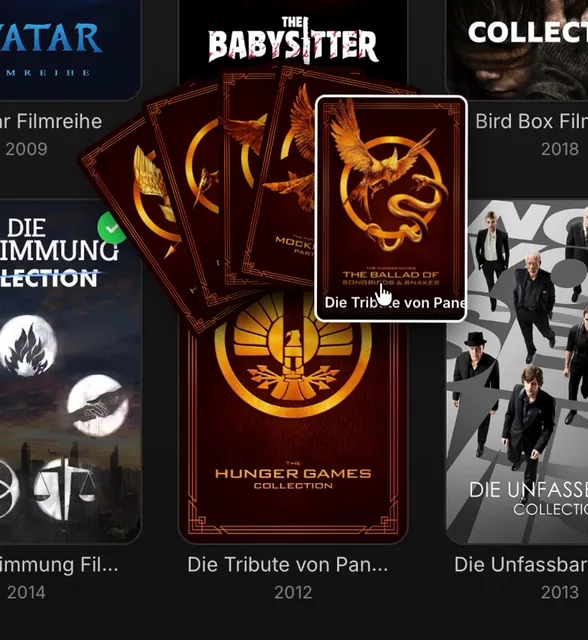
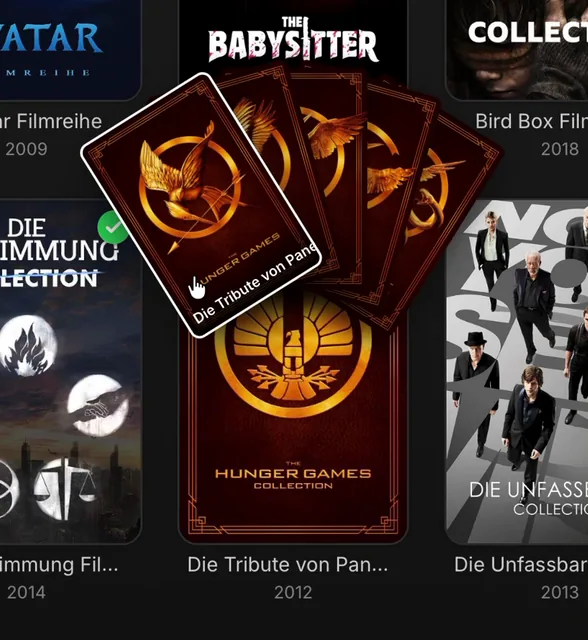
A hover preview that fans out posters, seasons and chapters.
- Status
- Green · Published
- Type
- script
- Hours
- about 10
- Tokens
- about 4.7 M
An extended version of malte9799's Collection Preview, and all credit for the idea stays with him.
In this article
Starting from a very good script
This is a fork and further development of Jellyfin – Collection Preview by malte9799, published as a GitHub Gist. All credit for the idea goes to him. His script fans out the posters of a collection above its card like a hand of cards. The preview follows your mouse, the nearest poster turns upright and shows its title, and a click opens that item. It is plain client-side JavaScript, and his three commits are still at the start of my repository.
The gap was in two places. The opening animation was not always consistent: sometimes the tiles just popped in. And it only covered collections. The goal was to calm the interaction down and bring the same effect to every kind of card.
Everything that can fan out now
Containers show their children. A collection shows its movies, a series its seasons, a season its episodes, and a home video folder its contents, which can be a mix of sub-folders and video files.
Single videos show their own chapters. On a movie, an episode or a home video file, the fan is built from Jellyfin's real chapter images. A click on a tile's play button jumps straight into the video at that timestamp. This is a completely different data path, since a video has no children.
Three additions change how it feels:
centerHoverOnlyopens the fan only when the pointer is on the play button in the middle of the card, not anywhere on it.subtileFocusPlayButtonputs a small play button on the focused tile.- Single wrapper folders are skipped. If every home video folder holds one fixed subfolder called "videos", the fan jumps past it. With one folder like "videos Instagram" a fuzzy match still skips it, and with two candidates both stay visible.
A wrapper folder is my own habit for home videos: the outer folder can have any name, but one inner folder always has the same name and holds nothing but the video files. Cover art, photos, backups and leftover cuts sit next to it, so scripts always know where the videos are. Skipping works both when the fan opens and when you click into a folder tile.
The fan itself still works the way malte9799 designed it. The tile nearest the pointer rises, turns upright and shows its title with a highlight ring, while its neighbours part around it. A click on a tile opens that item. Everything is client-side, and nothing changes on the server.
Seven card types, one global block
The script has seven config blocks in two families, and one global block on top.
| Block | Card type | What fans out |
|---|---|---|
CONFIG_SETS | Collections | The movies of the collection |
CONFIG_TVSHOWS | Series | The seasons |
CONFIG_TVSEASONS | Seasons | The episodes, with the tile shape detected from their thumbnails |
CONFIG_HOMEVIDEOS | Home video folders | Sub-folders and video files |
CONFIG_MOVIES | Movies | The movie's chapters |
CONFIG_EPISODES | Episodes | The episode's chapters |
CONFIG_HOMEVIDEOFILES | Home video files | The file's chapters |
Shared settings
Most fields repeat in the blocks with the same meaning, though not every block uses all of them. The defaults below are the usual ones.
| Setting | Starts at | What it does |
|---|---|---|
enabled | true | Master switch for this card type |
hoverDelay | 220 | Milliseconds before the fan opens on a full card hover |
maxPosters | 100 | Most tiles at once, and the rest collapse into a "+N more" tile (33 for home videos) |
posterWidth | 110 | Tile width in pixels for portrait content |
posterHeight | 165 | Tile height in pixels for widescreen content, used instead of the width |
maxSpreadDeg | 110 | Maximum total angle of the fan |
degPerPoster | 16 | Extra angle per tile, up to that ceiling |
lift | 130 | How far the fan rises above the card, in pixels |
overlap | 0.5 | How much of a tile stays inside the card, 0.5 is half in, half out |
hoverPushDeg | 11 | How far neighbours move apart from the focused tile |
hoverSpreadScale | 1.06 | Widens the fan slightly while the pointer tracks across it |
smoothing | 0.18 | How closely the fan follows the mouse, higher is snappier |
staggerMs | 28 | Delay between the opening of each tile |
closeMs | 220 | Length of the closing animation |
scrollSettleMs | 160 | Scroll silence needed before the preview may reopen |
sortBy | "PremiereDate" | Sort field, from SortName, CommunityRating, CriticRating, DateCreated, DatePlayed, PlayCount, ProductionYear, Runtime and Random to Budget, Revenue and the album fields |
sortOrder | "Ascending" | Ascending or Descending |
centerHoverOnly | true | Opens only on the play button in the middle of the card |
centerHoverOnlyDelay | 1500 | Delay for that mode, replacing hoverDelay |
centerHoverZoneRatio | 0.22 | Size of an invisible round zone on cards with no play button, such as folders |
subtileFocusPlayButton | true | Play button on the focused tile |
subtilePlayButtonSizeRatio | 0.4 | Its diameter as a fraction of the tile |
directPlayButtonTimeoutMs | 4000 | How long to wait for the real Play button on the target page |
directPlayRevealDelayMs | 500 | How long the black overlay stays after the click |
autoDetectAspectRatio | true | Works out the tile shape from the fetched images, on seasons and home videos |
aspectRatioCandidates | "2/3, 1/1, 4/3, 16/9" | The clean shapes a detected average snaps to |
fallbackAspectRatio | "2/3" | The shape used without detection, and "16/9" for chapters |
In centre hover mode the fan closes as soon as the pointer leaves the zone, with one exception: moving onto the open tiles keeps it open, otherwise you could never reach them. Chapter blocks have no sorting, because chapters always come in order.
Two details are easy to miss. Seasons and home videos work out their tile shape from the fetched images and snap the average to a clean ratio such as 2/3 or 16/9, so square covers and landscape thumbnails are not forced into poster shape. Scrolling counts as well: the preview waits for a short silence before it may reopen, so moving through a long library does not set off a fan on every card the pointer crosses.
Settings of single card types
- Collections:
showYearInTitleshows each tile as name and year. - Series:
skipSingleSeasonstops a pointless fan with one tile, andsingleSeasonShowEpisodesInsteadshows that season's episodes instead, using the season block's settings. Both are on. - Seasons:
showSeasonEpisodeNumberInTitleputs the season and episode number in front of the title. - Home video sorting: with
separateSortForFoldersAndVideos, off by default,folderSortBy,folderSortOrder,videoSortByandvideoSortOrderapply separately, andmixedOrderModechoosesfoldersFirstorvideosFirst. - Wrapper folders:
skipFolderLayerNamesEnabledis the master switch,skipFolderLayerNameslists the names, herevideos,skipFolderLayerExactMatchEnabledandskipFolderLayerFuzzyFallbackEnabledallow the two kinds of match, andmaxFolderSkipDepthof 1 is a safety cap against circular structures.
Global settings
| Setting | Starts at | What it does |
|---|---|---|
enablePreviewsOnHome | true | Preview on the Home page, for every card type |
enablePreviewsOnSimilarSection | true | Preview in "More Like This" |
enablePreviewsOnNextUp | true | Preview in "Next Up" for TV shows |
If the fan feels too busy, keep centerHoverOnly on, which is how it ships. If you want it faster, lower centerHoverOnlyDelay first, and leave the geometry alone until the timing feels right. It also respects the browser's reduced motion setting.
The workaround behind direct play
Direct play from a tile was the real hurdle. After a lot of experimenting and testing I found no other way than to go to the item's detail page and trigger its Play button by script. A black fade covers the step, so it is barely noticeable, or ideally not noticeable at all. The README says so openly.
A trick like that has consequences, and most of them came out in a later audit by Claude sessions, who also did the port to Jellyfin 12. The black overlay could stay on screen when playback did not start, so a timeout now takes it away. Chapter play ran into saved progress: the Play button on a detail page can mean Resume, so the chapter could lose to an old position. An option that reset the position sometimes marked an episode as fully watched, so that option went away.
Growing beyond collections was the other big step. TV shows and home videos were first only planned in the README. Once they were in, the script had nearly tripled in size. It now has about 2,450 lines, and it still stands on malte9799's idea.
Also part of Essentials
This script now also runs inside my Essentials plugin, with its settings on a normal dashboard page instead of values at the top of the code. On its own, through the JavaScript Injector, it works as before.
Connected
Next: Details Extended